
What this tool adds
What this tool adds to your bench
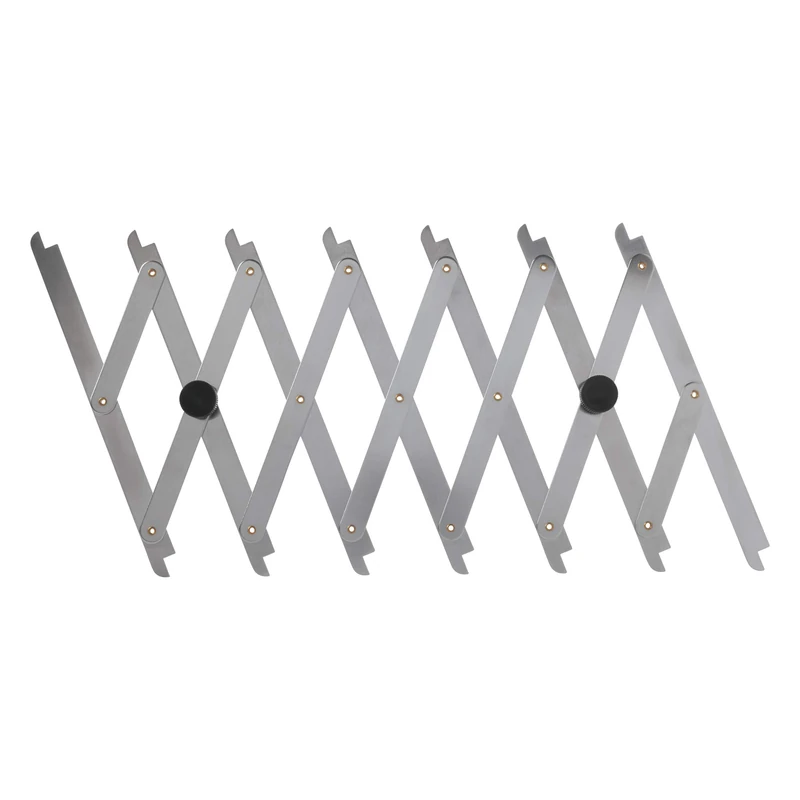
Choose the Point-to-Point when your layout needs repeated equal spacing along a board. The linked markers expand together, providing positions to transfer for tasks such as dowel locations, finger joints or dovetail spacing.
Trend gives a working span from 85 to 710 mm, approximately3.3 to 28 inches. That is a span across the work, not the distance between every adjacent pair of markers. Compare it with the total area you want to divide.
The selected description names stainless upright markers and a brass pinch-bolt locking mechanism. Set and secure the arrangement before transferring your marks. It is a layout tool; it does not supply a drill guide, a saw angle or a finished joint spacing without your layout plan.
Compare a dovetail slope marker when the angle of each tail is the part of the layout you need to reference. The Point-to-Point addresses equal positions instead. Confirm the selected marker count if your project requires a specific number:the listing and maker describe eight uprights and seven marking positions differently.
Choose for your actual work
- Compare total layout span, not an assumed gap between markers.
- Plan the number of divisions and slope layout separately.
Fit checks & limits
- Confirm the useful marking positions for your intended division: the descriptions differ between 7 and 8, so do not plan a fixed eight-part layout from the name alone.
- Use it as a layout tool, not a confirmed drilling guide. No numerical layout tolerance is specified.
Questions before you choose
Does the 28 inch figure mean the gap between points?
It describes the span across the work. It is not a stated adjacent-marker spacing.
Does it also give me a dovetail angle?
It provides equal position references. Compare a separate slope marker for the angled lines of a dovetail layout.
Can I assume it divides the board into eight pieces?
No fixed eight-piece result is established. The sources use different marker-count descriptions; confirm the selected arrangement and plan the required divisions.